Most people understand “software-as-a-service.” Few understand why “automation-as-a-service” is actually more profitable—and why it works better for solo operators than traditional agencies.
This isn’t about building the next SaaS unicorn. It’s about creating a sustainable service business that generates $100K-300K annually without requiring a team, venture capital, or technical complexity most founders can’t handle.
Here’s how the model actually works, what makes it different from other service businesses, and why the economics favor you more than they favor traditional consulting.
What Automation-as-a-Service Actually Is
The simple version: You help businesses automate repetitive workflows using no-code tools and AI, then charge for both implementation and ongoing maintenance.
The accurate version: You diagnose broken manual processes, design systems that fix them, build those systems using existing tools, and maintain them over time while the client pays you monthly to keep everything running.
It’s not consulting (you do the work, not just advise). It’s not development (you use existing tools, not custom code). It’s not managed services (you’re building systems, not managing infrastructure).
It’s its own category—and that’s why most people struggle to explain what they do at dinner parties.
The Core Economic Model
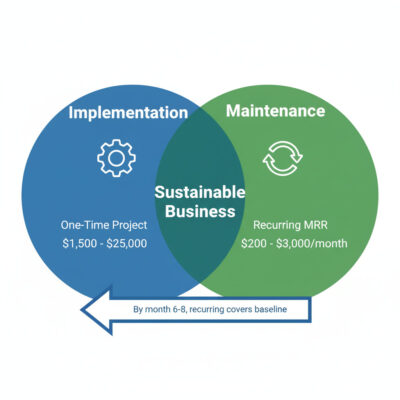
Revenue comes from two sources:
- Implementation fees (one-time): $1,500-$25,000 depending on complexity
- Maintenance retainers (recurring): $200-$3,000/month per client
The magic: By month 6-8, your recurring revenue covers your basic costs. Every new implementation becomes pure profit because your baseline is covered.
Example month 8:
- 6 active clients × $450/month average = $2,700 MRR (covers tools, taxes, basic expenses)
- 2 new implementations × $5,000 = $10,000 project revenue
- Total month: $12,700 (mostly profit after baseline covered)
This is different from pure project work (no recurring revenue) and different from pure retainer work (capped by your hours). You get both.
Four Ways to Structure the Model
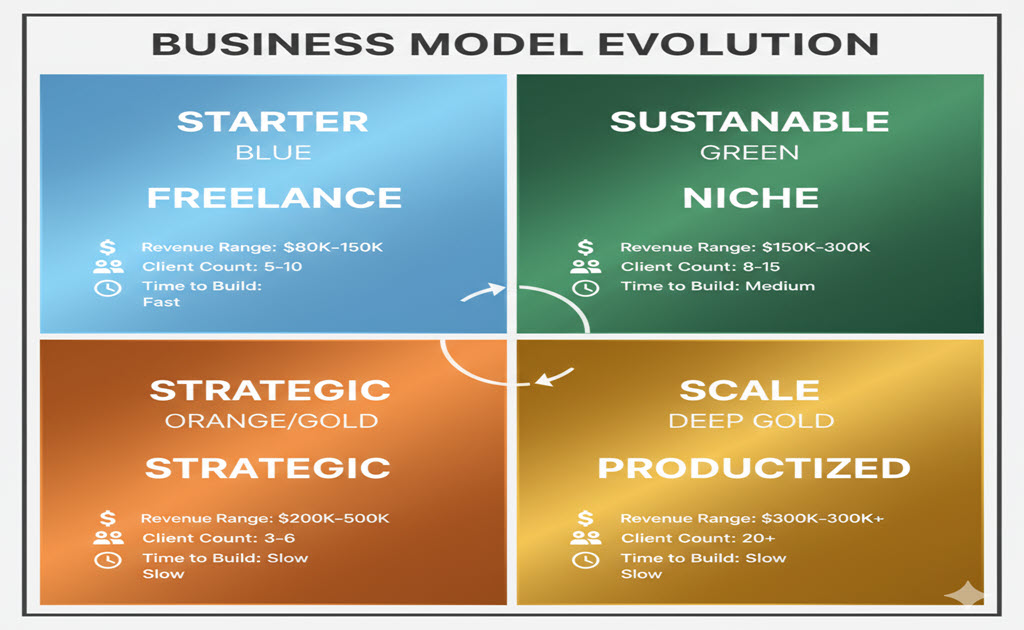
Most successful practitioners end up in one of these four structures. You don’t choose on day one—you evolve into whichever fits your strengths and market.
Model 1: Freelance Implementation (Start Here)
What it is: You sell project-based automation builds to individual businesses. One workflow per project. Fixed scope. Clear deliverable.
Revenue structure:
- Implementation: $2,000-$8,000 per automation
- Maintenance: $200-$800/month per client
- Target client count: 5-10 active clients
How you sell it: “I’ll automate your lead follow-up process so no inquiry sits unanswered for more than 10 minutes.”
Time investment per client:
- Discovery: 2-3 hours
- Design & build: 15-25 hours (first few clients), 6-10 hours (after template built)
- Training: 1-2 hours
- Monthly maintenance: 1-2 hours
Economics at scale (8 clients):
- $4,000 average implementation × 2 per month = $8,000
- $450 average retainer × 8 clients = $3,600 MRR
- Monthly total: $11,600 (~$140K annual)
Pros:
- Fast to start (first client in 30-60 days possible)
- Low overhead (just tool subscriptions)
- Clear value proposition (before/after is obvious)
- Easy to explain to prospects
Cons:
- Income initially tied to your hours
- Each client feels custom until you build templates
- Hard to scale past $150K without either raising prices significantly or adding team
- You’re doing sales, delivery, and support
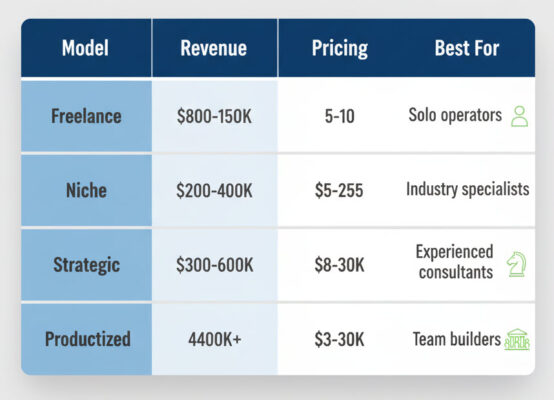
Best for: Solo operators who want $80K-150K revenue with maximum flexibility and control.
Related: Why Selling AI Automation Actually Works in 2026
Model 2: Niche-Specific Practice (Highest Margins)
What it is: Same as Model 1, but you specialize deeply in one industry vertical. You become “the automation consultant for real estate agents” or “the operations expert for e-commerce brands.”
Revenue structure:
- Implementation: $5,000-$25,000 (premium pricing)
- Ongoing optimization: $1,000-$3,000/month
- Target client count: 8-15 clients
How you sell it: “I help real estate agents automate their entire lead-to-close process. I’ve done this for 12 agents in the last 18 months. Here’s what changed for them.”
Time investment per client:
- Discovery: 1-2 hours (you know the problems already)
- Design & build: 8-15 hours (highly templated by client 5)
- Training: 1 hour (same workflow every time)
- Monthly maintenance: 1-2 hours
Economics at scale (10 clients):
- $12,000 average implementation × 1.5 per month = $18,000
- $1,500 average retainer × 10 clients = $15,000 MRR
- Monthly total: $33,000 (~$400K annual)
Pros:
- Premium pricing (specialists charge 2-3x generalists)
- Highly reusable workflows (80%+ template reuse by client 5)
- Strong referral network (clients know similar businesses)
- Easier marketing (you speak their language, know their pain)
Cons:
- Takes 3-6 months to build niche credibility
- Revenue ceiling limited by niche size (pick too small = problems)
- Harder to pivot if you pick wrong niche
- Requires existing understanding of industry or intense research
Best for: People with existing industry connections or deep vertical knowledge who want $200K-400K revenue.
Niche selection: 7 Profitable AI Automation Niches for 2026
Model 3: Strategic Automation Consulting
What it is: You sell automation strategy and roadmaps (consulting), then either implement yourself or coordinate implementation through partners/contractors.
Revenue structure:
- Strategy audit: $2,500-$8,000
- Implementation: $8,000-$30,000 (you do it) OR 20-30% of project (partner does it)
- Strategic retainer: $2,000-$5,000/month (ongoing guidance, not execution)
How you sell it: “I’ll audit your entire operation, identify the top 5 automation opportunities, prioritize them by ROI, then either build them or oversee implementation.”
Time investment per client:
- Strategy audit: 8-12 hours
- Implementation oversight: 10-20 hours (if managing partners)
- Direct implementation: 20-40 hours (if you build it)
- Monthly strategic calls: 2-4 hours
Economics at scale (6 clients):
- $5,000 average audit × 1.5 per month = $7,500
- $15,000 average implementation × 1 per month = $15,000 (if you build) OR $4,500 (if 30% commission)
- $3,000 average retainer × 6 clients = $18,000 MRR
- Monthly total: $40,500 if you implement, $30,000 if you coordinate (~$360K-480K annual)
Pros:
- Higher perceived value (strategist vs. executor)
- Can scale past your personal capacity via partners
- Attracts larger clients with bigger budgets
- More interesting work (diagnosis, not just execution)
Cons:
- Requires business consulting skills, not just technical
- Harder to sell without proven case studies (chicken-egg problem)
- Managing white-label partners adds complexity
- Longer sales cycles (bigger commitments)
Best for: Experienced consultants or former operators who want $300K-600K revenue and enjoy strategy more than implementation.
Model 4: Productized Service Packages
What it is: You create standardized automation packages with fixed scope, pricing, and deliverables. Clients pick a package, you deliver a known solution.
Revenue structure:
- Package 1 (Single Workflow): $3,000-$5,000 implementation + $300-$500/month
- Package 2 (Department Suite): $8,000-$12,000 implementation + $800-$1,200/month
- Package 3 (Business System): $18,000-$30,000 implementation + $1,500-$2,500/month
- Target client count: 15-30 clients
How you sell it: “We have three packages. Based on what you described, Package 2 solves your lead management, customer onboarding, and reporting problems. Here’s exactly what you get.”
Time investment per client:
- Discovery: 1 hour (they self-qualify into packages)
- Design: 0 hours (pre-designed packages)
- Build: 8-12 hours (templated delivery)
- Training: 1 hour (recorded videos + live walkthrough)
- Monthly maintenance: 1 hour
Economics at scale (20 clients):
- Package mix delivering ~$7,000 average × 3 per month = $21,000
- $700 average retainer × 20 clients = $14,000 MRR
- Monthly total: $35,000 (~$420K annual)
Pros:
- Repeatable delivery (same thing over and over)
- Can build team around standardized processes (easier to hire)
- Clearest path to $300K+ revenue
- Clients self-qualify (less sales time)
Cons:
- Takes 6-12 months to refine packages that actually sell
- Requires marketing systems to generate leads at scale
- Less flexibility to customize (some prospects won’t fit packages)
- Need more volume (20-30 clients vs. 8-10)
Best for: Operators who want to build a real company with team and systems, not stay solo forever.
Packaging guide: How to Package and Price Automation Services
The Evolution Path (How You Actually Grow)
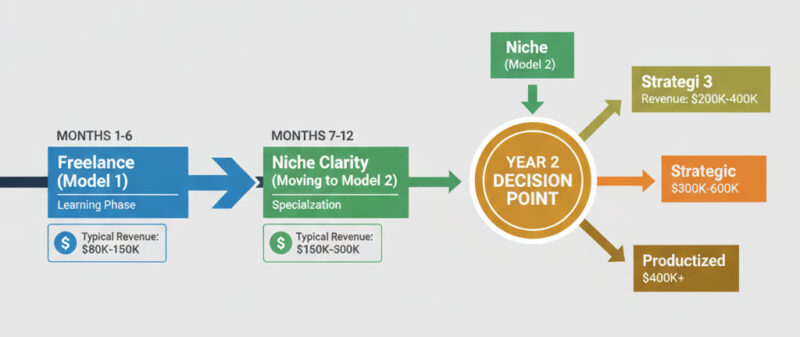
Nobody starts with Model 4. Here’s the realistic progression:
Months 1-6: Freelance Implementation (Model 1)
- Land your first 3-5 clients
- Figure out what problems are worth solving
- Build your core workflow templates
- Get comfortable with discovery, sales, delivery
Months 7-12: Niche Clarity (Moving toward Model 2)
- Notice that 4 of your 7 clients are in the same industry
- Lean into that industry deliberately
- Adjust positioning and marketing
- Start charging premium prices (1.5-2x your original rates)
Year 2: Decision Point
- Option A: Stay Model 2 (niche specialist, solo or small team, $200K-400K)
- Option B: Add strategic layer (Model 3, hire for implementation, $300K-600K)
- Option C: Productize (Model 4, build team, standardize, $400K+)
Most successful practitioners stay in Model 2. It has the best balance of income, flexibility, and reasonable hours. Models 3 and 4 require managing people or significantly more complex operations.
What Makes This Different From Other Services
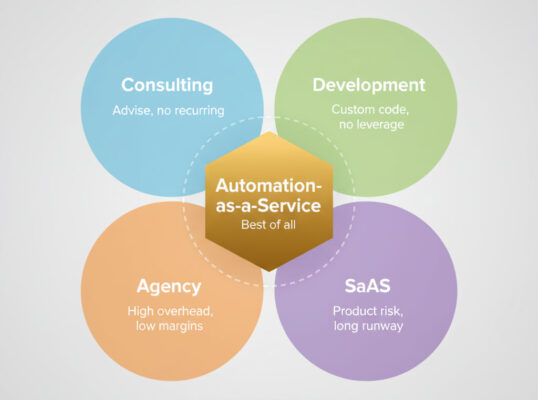
vs. Traditional Consulting:
- You do the work, not just advise
- Recurring revenue from maintenance
- Tools do heavy lifting (you’re orchestrating, not executing)
vs. Web Development:
- No custom code (faster delivery)
- Recurring revenue built in
- Highly reusable templates
- Clients don’t need to manage what you build
vs. Agency Model:
- Can start and scale solo
- No need for specialists (you learn 3-4 tools deeply)
- Lower overhead (no office, minimal tools)
- Better margins (60-70% vs. 30-40% for agencies)
vs. SaaS:
- No product development risk
- Revenue starts month 1-3, not month 12-24
- No investor pressure
- Sustainable on services revenue alone
The key difference: You’re building systems using existing tools, which means fast time-to-value for clients and high reusability for you. You get the leverage of products without the risk and complexity of building products.
The Revenue Model Breakdown
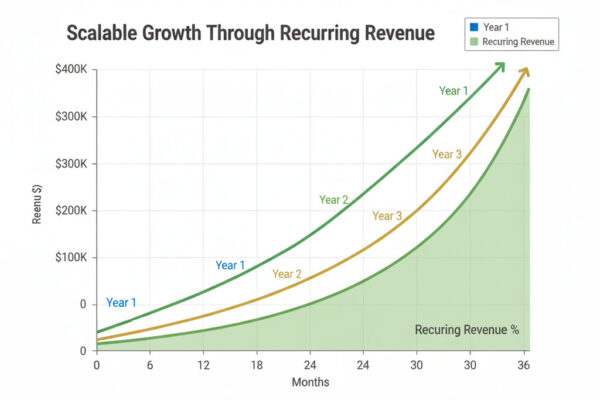
Let’s look at realistic revenue at three different stages:
Year 1: Building ($60K-120K)
Months 1-3: $0-2,000/month (learning, first client) Months 4-6: $3,000-6,000/month (2-3 clients, underpriced) Months 7-9: $8,000-12,000/month (5-6 clients, better pricing) Months 10-12: $12,000-18,000/month (7-8 clients, recurring kicking in)
Revenue split:
- 70% project work
- 30% recurring
Time investment: 25-35 hours/week
Year 2: Established ($120K-250K)
Average month:
- 8-12 active maintenance clients: $5,000-10,000 MRR
- 2-3 new implementations: $10,000-20,000
- Monthly: $15,000-30,000
Revenue split:
- 40% project work
- 60% recurring
Time investment: 30-40 hours/week (at capacity if solo)
Year 3: Scaled ($200K-400K+)
Average month:
- 12-20 active clients: $10,000-20,000 MRR
- 2-4 implementations: $15,000-30,000 (higher prices OR team helping)
- Monthly: $25,000-50,000
Revenue split:
- 30% project work
- 70% recurring
Time investment: 35-40 hours/week with team, OR 25-30 hours/week solo at premium prices
The pattern: As recurring revenue grows, you rely less on constantly landing new projects. By year 3, you can be selective about new clients because baseline costs are covered.
Critical Success Factors
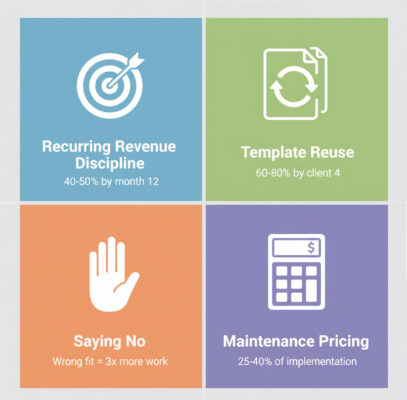
Factor 1: Recurring Revenue Discipline
The mistake: Focusing only on landing new projects, ignoring maintenance quality.
What actually works: Treating maintenance clients as your foundation. They pay every month. They refer new clients. They upsell to additional automations.
Target ratio by month 12: 40-50% of revenue from recurring.
If you’re at month 12 with less than 30% recurring, something’s wrong:
- You’re not including maintenance in your offers
- Your automations break too often (clients cancel)
- You’re not asking for renewals
Factor 2: Template Reuse
The mistake: Treating every client as custom work.
What actually works: By client #4, 60-80% of your work should be template-based with minor customization.
How to know you’re doing it right: Client #5 takes 40% of the time client #1 took.
If client #5 still takes as long as client #1:
- You’re in too many different industries (no replication)
- You’re saying yes to custom requests instead of standardizing
- You’re not documenting well enough
Factor 3: Saying No
The mistake: Accepting every project because you need revenue.
What actually works: By month 6, you should start saying no to:
- Clients outside your niche (if you’ve picked one)
- Projects that require tools you don’t know well
- Clients who “just want to try something” without real pain
- Businesses with broken processes (fix process first, then automate)
Why it matters: Every “wrong fit” client you take is opportunity cost. They take 2x longer, cause 3x more support issues, and don’t refer similar clients.
Factor 4: Maintenance Pricing
The mistake: Charging $100-200/month “just to cover costs.”
What actually works: Maintenance should be 25-40% of implementation fee, charged monthly.
Example:
- Implementation: $5,000
- Maintenance: $400-500/month
Why: Maintenance includes monitoring, fixing breaks, handling edge cases, updating when tools change, and being available for questions. That’s worth 25-40% of implementation annually.
If you’re undercharging for maintenance:
- Your recurring revenue never covers costs
- You resent maintenance clients
- You can’t afford to keep systems running well
Common Failure Modes
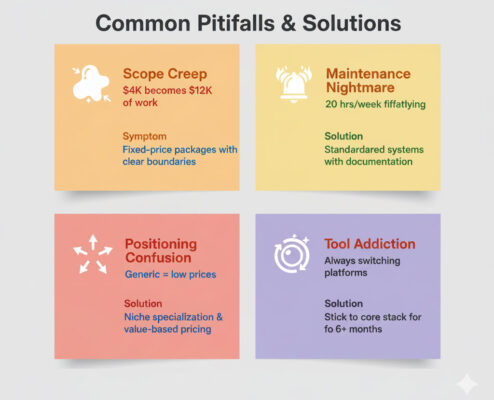
Failure 1: The Scope Creep Death Spiral
What it looks like: Client asks for “just one more thing.” You say yes without repricing. Happens 3-4 times. Your $4K project becomes $12K of work.
Why it kills businesses: You’re losing money on every project. Can’t scale what isn’t profitable.
How to avoid it: Clear scope documents. Change orders for anything outside scope. “Happy to add that—here’s the additional cost and timeline.”
Failure 2: The Maintenance Nightmare
What it looks like: You have 10 clients, each with custom workflows that break every 2 weeks. You spend 20 hours/week just keeping things running.
Why it kills businesses: You become a full-time firefighter. No time for new sales. Burnout by month 10.
How to avoid it: Build standardized error handling from day one. Use monitoring tools. Create runbooks for common problems. If something breaks twice, build a permanent fix.
Failure 3: The Positioning Confusion
What it looks like: Your website says “AI automation for businesses.” Your LinkedIn says “No-code consultant.” Your proposals say “Workflow optimization expert.”
Why it kills businesses: Prospects don’t know what you do. You sound generic. Generic = low prices, poor close rates.
How to avoid it: Pick one positioning and stick to it for at least 6 months. “I help real estate agents automate lead follow-up” is 10x better than “I do AI automation.”
Positioning help: Building an AI Automation Brand
Failure 4: The Tool Addiction
What it looks like: You spend 10 hours learning n8n because it’s “more powerful than Make.com.” Then you discover Pipedream. Then you want to try the new AI workflow tool that just launched.
Why it kills businesses: You’re optimizing tools, not serving clients. Your templates break because you keep switching platforms.
How to avoid it: Master Make.com and ChatGPT. That’s it. Add new tools only when specific client needs require them. “Best tool” matters less than “tool you know deeply.”
The Next 90 Days
If you’re starting from zero, here’s the realistic roadmap:
Days 1-30: Learn + Build
- Pick ONE workflow type to master
- Build it for yourself or a friend (free)
- Document everything with screenshots
- Investment: 20-30 hours, $50-100 in tools
Days 31-60: Position + Package
- Define your niche (or at least narrow your target)
- Create a simple offer (“I’ll automate your lead follow-up”)
- Price it ($2,500-3,500 implementation + $300-400/month)
- Investment: 10-15 hours
Days 61-90: Sell + Deliver
- Reach out to 15-20 prospects (warm network or direct outreach)
- Close 1-2 projects
- Deliver successfully
- Get testimonials
- Investment: 25-35 hours/week
End of 90 days: You should have 1-2 paying clients, 1-2 testimonials, and clear sense of what’s working.
If you don’t: Something went wrong in days 31-60 (positioning) or days 61-90 (outreach volume). Fix that before trying to optimize anything else.
The Business Model Advantage
Here’s why this model works better than most service businesses:
Leverage: Your 10th client takes less time than your first (rare in services) Predictability: Recurring revenue makes planning possible by month 8-10 Scalability: Can go from $80K to $300K+ without massive infrastructure changes Sustainability: 30-40 hour weeks at $200K+ is realistic by year 2-3 Exit options: Recurring revenue businesses sell for 2-4x annual revenue (if you want out)
The catch: It takes 6-12 months to build. Most people quit at month 4-5 when they’re still underpriced and overworked. The leverage kicks in at month 6-8.
If you’re expecting “30 days to $10K,” this isn’t for you. If you’re okay with “6 months to sustainable six-figure income,” this is one of the better service models available.
Ready to implement? This is the business model breakdown. For the complete implementation roadmap, client acquisition systems, and operational details, read: Building a Six-Figure Automation Business: The Complete Roadmap
Next steps:
- Choose your approach: Which model fits your situation and goals?
- Understand discovery: How to Conduct Discovery Calls That Reveal Bottlenecks
- Price correctly: How to Package and Price Automation Services