Most automation “experts” will tell you this is the future. I’m here to tell you whether it’s actually worth your time—and if so, how to build it without the usual trial-and-error tax that costs most people two years and $30K in lost opportunity.
This isn’t theory. It’s the roadmap I wish I’d had when I started, distilled from watching 50+ freelancers attempt this transition. Some made it. Most didn’t. The difference wasn’t talent—it was knowing what actually matters versus what just sounds important.
If you’re considering selling automation services, this guide will save you from the expensive mistakes that kill most attempts in the first six months.
What This Actually Is (And Isn’t)
This is: A complete business model breakdown for building a consulting practice that helps businesses automate repetitive workflows using AI tools and no-code platforms.
This isn’t: A get-rich-quick scheme, a course pitch, or a promise that “everyone can do this.” Some people will read this and realize it’s not for them. That’s the point.
You’re going to learn:
- Whether this opportunity is real or overhyped (spoiler: both)
- What it actually takes to land and deliver your first client
- The economics that determine if you’ll make $30K or $150K+ in year one
- Which mistakes kill most attempts (and how to avoid them)
- The specific systems that separate sustainable businesses from burnout cases
Time investment to read: 25 minutes Time investment to implement: 6-12 months to six figures, if you execute correctly
Let’s start with the uncomfortable truth most people skip.
Part 1: Is This Opportunity Real? (Market Reality Check)
The Market Window Is Open—But Closing
In 2024, businesses were asking “does AI work?” In 2025-2026, they’re asking “who can make it work without breaking what we already have?”
This shift—from experimentation to implementation—creates a 12-18 month window where consultants who can translate AI capabilities into business relief have genuine pricing power.
Why the window is real:
- 73% of small businesses (under 50 employees) have identified at least one manual process they want automated (according to recent small business surveys)
- Average business owner spends 8-12 hours per week on repetitive tasks they know could be automated
- Most tried a tool (Zapier, ChatGPT, Make.com) and got stuck configuring it
- They’re willing to pay someone to make it work
Why the window is closing:
- By late 2026-2027, this becomes commoditized like web design did by 2014
- Tool companies are building better onboarding and templates
- AI models are getting better at building automations themselves
- The “I can figure this out” threshold keeps dropping
What this means for you: If you start now, you’re early enough to charge premium rates ($3K-15K per project). If you wait 18 months, you’re competing on price with templates and DIY tools.
Read the full market analysis: Why Selling AI Automation Actually Works in 2026
What Success Actually Looks Like (Real Numbers)
Let me show you three actual trajectories from people who started in 2024-2025:
Trajectory A: “The Quick Win”
- Month 1-2: Learned tools, built first workflow for free
- Month 3: First paid client at $2,500 (underpriced, took 50 hours)
- Month 6: Five clients, $8K/month revenue, still doing everything manually
- Month 12: Burned out, margins terrible, quit to go back to regular freelancing
- Annual revenue: ~$65K (but worked 60-hour weeks)
Trajectory B: “The System Builder”
- Month 1-3: Learned tools, built first workflow, documented everything
- Month 4: First paid client at $4,500 (still underpriced but documented process)
- Month 6: Three clients at $12K/month, started templatizing workflows
- Month 9: Created service packages, hired VA for admin work
- Month 12: Eight clients at $22K/month, 30-hour work weeks
- Annual revenue: ~$180K (and sustainable)
Trajectory C: “The Experimenter”
- Month 1-6: Tried five different niches, no clear positioning
- Month 7: Finally picked one niche, started over with positioning
- Month 10: First client at $3K
- Month 12: Three clients at $7K/month
- Annual revenue: ~$50K (but learned what works, positioned for year two)
The difference between A and B wasn’t talent. It was systems thinking from day one. Person A sold custom work. Person B sold reusable systems with custom implementation.
The difference between B and C was niche clarity. Person B picked a vertical (e-commerce, SaaS, professional services) and became known for it. Person C tried to be everything to everyone.
The Uncomfortable Prerequisites
Before you continue, here’s what this actually requires. If these don’t describe you, this might not be your opportunity:
You need:
- 15-25 hours per week for the first 3-6 months (can’t do this in spare evenings)
- $500-1,500 to invest in tools, learning, and first project materials
- Comfort with technology (not coding, but you can’t be the person who’s afraid of software)
- Ability to have business conversations with owners/operators (not just follow tutorials)
- 6 months of financial runway (first real revenue typically month 3-4)
You don’t need:
- A computer science degree or coding background
- Expensive certifications or courses
- A huge audience or email list
- Prior business consulting experience (though it helps)
If you’re still reading, let’s talk business model.
Part 2: Business Model Options (Choosing Your Path)
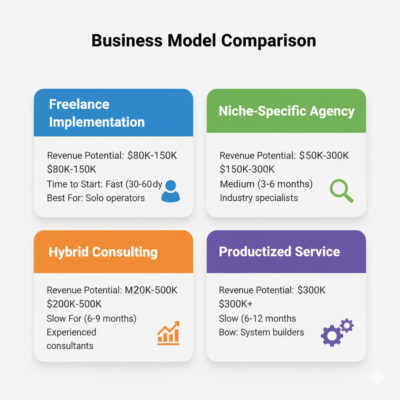
There are four viable ways to structure this. Most people try to do all of them at once and end up doing none of them well.
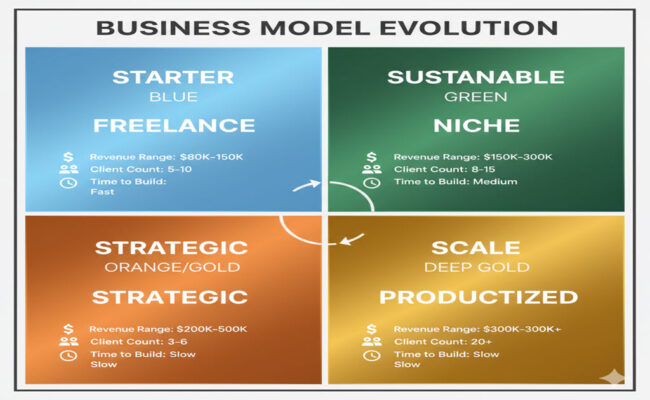
Option 1: Freelance Implementation (Easiest to Start)
What it is: You sell project-based automation builds to individual businesses. Think “I’ll automate your lead follow-up process” or “I’ll build a workflow that connects your CRM to your email system.”
Revenue model:
- Project fees: $1,500-$8,000 per automation
- Monthly maintenance: $200-$800 per client
- Target: 5-10 active clients
Pros:
- Fast to start (can land first client in 30-60 days)
- Low overhead (just tool subscriptions)
- Clear value proposition (fix specific problem)
Cons:
- Income tied to your hours initially
- Each client feels custom until you build templates
- Hard to scale past $150K without team
Best for: Solo operators who want $80K-$150K revenue with high flexibility
Deep dive: The Automation-as-a-Service Business Model
Option 2: Niche-Specific Agency (Highest Margins)
What it is: You specialize in one industry vertical (e.g., real estate, e-commerce, professional services) and become the go-to automation consultant for that niche.
Revenue model:
- Implementation packages: $5,000-$25,000
- Ongoing optimization: $1,000-$3,000/month
- Target: 8-15 clients
Pros:
- Premium pricing (you’re the specialist, not generalist)
- Highly reusable workflows (same problems across vertical)
- Strong referral network (clients know similar businesses)
Cons:
- Takes 3-6 months to build niche credibility
- Revenue ceiling limited by niche size
- Harder to pivot if you pick wrong niche
Best for: People with existing industry connections or deep vertical knowledge who want $150K-$300K revenue
Niche selection guide: 7 Profitable AI Automation Niches for 2026
Option 3: Hybrid Consulting + Implementation
What it is: You sell strategic automation roadmaps (consulting) and then either implement yourself or white-label to implementation partners.
Revenue model:
- Strategy audits: $2,500-$8,000
- Implementation: $8,000-$30,000 (you do) or 20-30% commission (white-label)
- Retainer: $2,000-$5,000/month for ongoing strategy
Pros:
- Higher perceived value (you’re the strategist, not just executor)
- Can scale past your personal capacity via partners
- Attracts larger clients with bigger budgets
Cons:
- Requires business consulting skills, not just technical
- Harder to sell if you don’t have proven case studies
- Managing white-label partners adds complexity
Best for: Experienced consultants or former operators who want $200K-$500K+ revenue
Option 4: Productized Service (Most Scalable)
What it is: You create standardized automation packages with fixed scope and pricing. Think “Lead Response Automation Package” or “E-commerce Order Automation System.”
Revenue model:
- Package pricing: $3,000-$12,000 fixed price
- Monthly monitoring: $300-$1,200
- Target: 15-30 clients
Pros:
- Repeatable delivery (you do the same thing over and over)
- Can build team around standardized processes
- Clearest path to $300K+ revenue
Cons:
- Takes 6-12 months to refine packages that actually sell
- Requires marketing systems to generate leads at scale
- Less flexibility to customize (some clients won’t fit)
Best for: Operators who want to build a real company with team and systems
Packaging guide: How to Package and Price Automation Services
Which One Should You Choose?
Start with Option 1 (Freelance Implementation) for your first 3-6 months and 3-5 clients. This lets you:
- Learn what clients actually need vs. what they say they need
- Build reusable workflow templates
- Develop case studies and pricing intuition
- Figure out which industries you naturally understand
Then transition to:
- Option 2 if you discover strong niche fit (most common path)
- Option 3 if you’re better at strategy than implementation (requires consulting skills)
- Option 4 if you identify 2-3 highly repeatable workflows that multiple clients buy (requires marketing chops)
Most successful practitioners end up as a hybrid of Options 1 and 2—freelance implementation within a specific niche. This gives you the benefits of specialization without requiring a full agency team.
Part 3: The First Client Roadmap (Month 1-4)
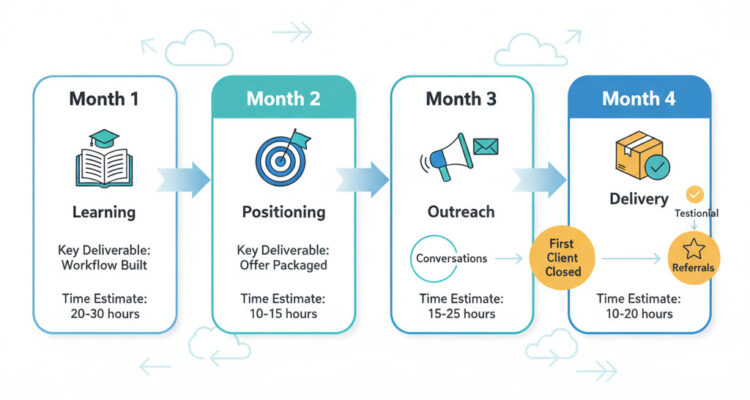
This is where most people get stuck. You know the opportunity is real. You’ve picked a business model. But how do you actually land the first client when you have no portfolio?
Month 1: Learn + Build Your First Workflow
Goal: Build one complete automation workflow that solves a real problem (even if it’s your own).
What to do:
Week 1-2: Pick one workflow to master
Don’t try to learn everything. Pick ONE automation type:
- Lead capture → CRM → Follow-up email sequence
- New order → Slack notification → Update inventory spreadsheet
- Customer question → AI response → Human review if complex
- Invoice sent → Payment tracking → Reminder sequence
Why just one: You need to go deep enough to handle edge cases. Surface-level knowledge shows in client conversations.
Week 3-4: Build it for yourself or a friend
Actually implement the workflow. Encounter the frustrations. Solve the problems. Document every step with screenshots.
Tools to learn (pick 3-4, not all):
- Make.com or Zapier (workflow automation) – Start with Make, it’s more powerful
- ChatGPT API or Claude API (AI decisions and text generation)
- Airtable or Google Sheets (data management)
- Gmail, Slack, or Webhook triggers (starting points)
Time investment: 20-30 hours Cost: $0-$200 in tool subscriptions
Resource: The Complete AI Automation Tool Stack
Month 2: Position + Package Your Offer
Goal: Create a clear offer that solves a specific problem for a specific type of business.
Bad positioning: “I do AI automation for businesses” Better positioning: “I help real estate agents automate lead follow-up so no inquiry goes unanswered for more than 5 minutes”
How to pick your positioning:
- What industry do you already understand? (From past work, side projects, or personal interest)
- What manual process is obviously broken in that industry? (Talk to 3-5 people to confirm)
- Can you solve it with the workflow you just built? (If no, adjust your workflow or positioning)
Package your offer as an outcome:
- Not: “I’ll build a Make.com workflow with ChatGPT integration”
- But: “I’ll fix your lead response problem so every inquiry gets a personalized reply within 10 minutes, even when you’re busy”
Pricing for first client: $2,000-$3,500 for implementation + $200-$400/month maintenance
Why underpriced? Because you need the case study more than you need profit on client #1. You’ll make it up on clients #3-10.
Positioning guide: Building an AI Automation Brand
Month 3: Land Your First Client
Goal: One paying client, even if the project is small.
The three paths that actually work:
Path 1: Warm Network Offer (Fastest)
Message 10-15 people in your network who fit your positioning:
“Hey [Name], I’m helping [your niche] automate [specific problem]. I noticed you’re still [description of manual process]. I’m taking on 2 clients this month at a discounted rate while I build my portfolio. Would it make sense to show you what this looks like for your business? No obligation if it’s not a fit.”
Conversion rate: 10-20% will say yes to a conversation. 50% of conversations turn into projects.
Expected timeline: 2-4 weeks to close first client
Path 2: Case Study + Direct Outreach (Medium Speed)
Build the automation for yourself or a friend. Document the results with screenshots and numbers:
- “Before: 47 leads sitting in email unanswered for 24+ hours”
- “After: Every lead gets personalized response in 8 minutes average”
- “Result: 23% more leads converting to appointments”
Use this case study to reach out to 20-30 similar businesses with:
“I just helped [similar business] fix their [specific problem] using AI automation. Saved them 8 hours per week. Would you want to see if this would work for your business?”
Conversion rate: 5-10% will respond. 30-40% of conversations turn into projects.
Expected timeline: 4-6 weeks to close first client
Path 3: Free Pilot Project (Slowest but Best Learning)
Find one business with a problem you’re confident you can solve. Offer to fix it for free in exchange for:
- Testimonial and case study
- 3 referrals to similar businesses
- Permission to use their name/logo
Conversion rate: 60-80% will say yes (it’s free). 100% becomes your case study.
Expected timeline: 6-8 weeks (project takes longer without pressure)
Most people should use Path 1 or 2. Path 3 is only worth it if you have zero network in your target industry.
Discovery call framework: How to Conduct Discovery Calls That Reveal Bottlenecks
Month 4: Deliver + Document
Goal: Successfully deliver your first project and create reusable assets for the next one.
What actually matters in delivery:
1. Over-communicate progress Weekly updates showing what you’ve built, even if it’s not done. Clients fear silence more than slow progress.
2. Document every decision Why you connected systems this way, what alternatives you considered, what edge cases you’re handling. This becomes your internal playbook.
3. Create a maintenance plan Most workflows break within 30 days due to API changes, edge cases, or usage patterns you didn’t anticipate. Plan for it.
4. Get the testimonial while results are fresh Ask within 7 days of going live: “What changed for your business after we implemented this?” Record their answer. That’s your testimonial.
5. Ask for referrals explicitly “Who else do you know facing [the problem you just solved]?” Get 2-3 warm intros before the project officially ends.
Common delivery mistakes that kill momentum:
- Scope creep without repricing: Client asks for “just one more thing” and you say yes without charging. Do this 3 times and your $3K project becomes $8K of work.
- Perfectionism: You spend 40 hours on something that could be 80% effective in 10 hours. Ship the 80% version, iterate based on real usage.
- Not handling edge cases: Your automation works perfectly until someone enters data in an unexpected format and the whole thing breaks. Build error handling from the start.
Workflow tutorial: Building Your First Client Automation Workflow Avoiding pitfalls: 5 Projects That Look Simple But Aren’t
End of Month 4: You should have one completed project, one case study, one testimonial, and 2-3 referral conversations started.
If you don’t, something went wrong in Month 2 or 3. Go back and fix your positioning or outreach approach before moving forward.
Part 4: Scaling to $100K+ (Month 5-12)
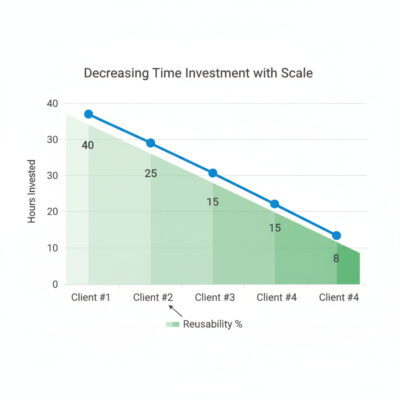
Now you have proof of concept. The next phase is turning one client into a repeatable system that generates $8K-$15K monthly.
The Replication Framework
Client #1: 40 hours of work, mostly figuring out what to build Client #2: 25 hours of work, 60% reusable from client #1 Client #3: 15 hours of work, 75% reusable Client #4: 8 hours of work, 85% reusable
This is the leverage curve. If you don’t see this pattern by client #4, you’re either:
- Working in too many different industries (no reusability)
- Not documenting your workflows well enough
- Saying yes to custom requests instead of repeating what works
How to accelerate replication:
1. Templatize your workflows
After client #2, identify the 80% that’s identical:
- Same trigger points (form submission, new email, order placed)
- Same decision logic (if X, do Y)
- Same tool connections (Make.com → ChatGPT → Airtable)
Create a template with placeholder variables for client-specific details (their API keys, their branding, their business rules).
2. Standardize your process
Every client goes through the same steps:
- Discovery call (45 min) using the same question framework
- Workflow diagram (delivered in 48 hours) showing what you’ll build
- Build phase (1-2 weeks) with Monday/Thursday progress updates
- Testing phase (3-5 days) where they test with real data
- Go-live + training (1 hour) walking them through how it works
- 30-day check-in to handle issues
This consistency means:
- Clients know what to expect (fewer support questions)
- You know exactly how long each phase takes (better pricing)
- You can eventually hire someone to handle phases 2-4
3. Package your pricing
Stop quoting hourly or custom project prices. Create 2-3 fixed packages:
Package 1: “Single Workflow Automation”
- One process automated (lead follow-up, invoice tracking, customer onboarding)
- Up to 3 system connections
- 30 days of included support
- Price: $3,500 implementation + $300/month maintenance
Package 2: “Department Automation”
- 2-3 related processes automated
- Up to 6 system connections
- Custom workflow design
- 60 days of included support
- Price: $8,500 implementation + $650/month maintenance
Package 3: “Business Automation System”
- Complete workflow audit and implementation
- Unlimited connections
- Priority support and monthly optimization
- Price: $18,000 implementation + $1,500/month maintenance
Why packages work:
- Clients can self-qualify (“I need Package 1”)
- You spend less time on custom quotes
- Higher perceived value than hourly pricing
- Encourages clients to buy bigger packages
Most of your revenue will come from Package 1 and 2. Package 3 exists to make Package 2 look reasonable.
Detailed pricing psychology: How to Package and Price Automation Services
The Client Acquisition System (Months 5-12)
You can’t rely on referrals forever. By month 5-6, you need a repeatable way to generate leads.
The three channels that work for automation services:
Channel 1: LinkedIn Content + Outreach
What to do:
- Post 3x per week about automation problems you’re solving
- Share specific before/after examples (with permission)
- Use case studies as conversation starters in DMs
- Join relevant industry groups and answer questions
Time investment: 5-7 hours per week Expected results: 2-4 qualified conversations per month Close rate: 30-40% of conversations become clients
Why it works: Decision-makers are on LinkedIn actively looking for solutions. You show up as the expert who solves their specific problem.
Channel 2: Case Study SEO
What to do:
- Write detailed case studies for each client (with permission)
- Optimize for “[industry] automation” keywords
- Publish on your site with clear CTAs
- Distribute to Medium, LinkedIn articles, industry forums
Time investment: 4-6 hours per case study (write once, use forever) Expected results: 1-3 inbound leads per month by month 8-10 Close rate: 40-50% of inbound leads close (they found you, not vice versa)
Why it works: People searching for solutions find your real examples and see proof you can deliver.
Channel 3: Partner Referrals
What to do:
- Identify complementary service providers (web developers, marketing agencies, business consultants)
- Offer 15-20% referral fee for qualified intros
- Create co-marketing content showing how automation + their service = better client results
Time investment: 2-3 hours per week maintaining relationships Expected results: 1-2 referrals per partner per quarter (once relationship is established) Close rate: 50-60% (warm intro from trusted source)
Why it works: Their clients already trust them. You get borrowed credibility.
Pick ONE channel for months 5-8. Master it. Then add a second channel in months 9-12.
Trying to do all three at once means none of them work well enough to generate consistent leads.
The $100K Math
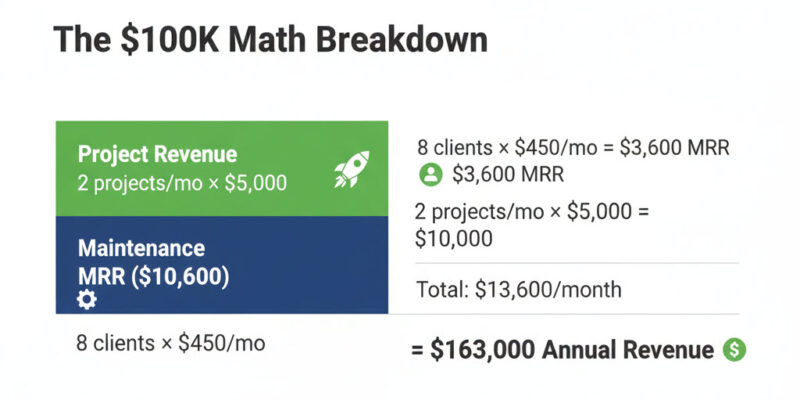
Here’s how you actually get to six figures in year one:
Scenario A: Freelance Implementation Model
- 8 active clients paying average $450/month maintenance = $3,600/month recurring
- 2 new projects per month at average $5,000 = $10,000/month project revenue
- Total monthly: $13,600
- Annual run rate: $163,200
Time to reach: 9-12 months from first client
Scenario B: Niche-Specific Agency Model
- 6 active clients paying average $800/month retainer = $4,800/month recurring
- 1.5 new projects per month at average $12,000 = $18,000/month project revenue
- Total monthly: $22,800
- Annual run rate: $273,600
Time to reach: 12-15 months from first client (longer ramp due to premium positioning)
Scenario C: Hybrid Volume Model
- 12 active clients paying average $300/month = $3,600/month recurring
- 3 new small projects per month at average $3,000 = $9,000/month project revenue
- Total monthly: $12,600
- Annual run rate: $151,200
Time to reach: 8-10 months from first client (faster due to lower price point)
The pattern: You need 6-12 clients generating $10K-$20K monthly revenue to hit six figures. That’s it.
Most people fail because they:
- Chase too many different types of clients (no replication leverage)
- Underprice and can’t reach the numbers (need 20 clients instead of 8)
- Don’t create recurring revenue (project-only model requires constant new sales)
When to Hire Your First Team Member
Don’t hire until:
- You have 6+ active clients
- You’re personally working 35+ hours per week on delivery
- You have documented processes for tasks you want to delegate
- You have $15K+ monthly revenue for 3+ consecutive months
First hire should be: Virtual assistant or junior automator to handle:
- Client communication and project updates
- Testing and quality assurance
- Documentation and screenshot creation
- Simple workflow modifications
Cost: $1,500-$3,000/month (VA or part-time contractor) Time freed up: 15-20 hours per week (which you reinvest in sales and strategy)
Common mistake: Hiring too early and spending more on team than you’re making in profit. Stay solo until the math clearly works.
Scaling guide: From 1 Client to 10: Scaling Without Burnout
Part 5: What Actually Kills Automation Businesses
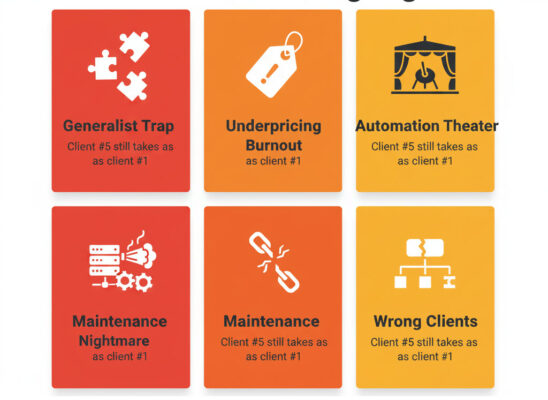
Let’s talk about the failures. Not to discourage you, but so you can recognize the warning signs and course-correct before it’s too late.
Failure Mode #1: The Generalist Trap
What it looks like: You say yes to every project. E-commerce one month, real estate the next, SaaS the month after. Each client feels completely custom because you’re solving totally different problems.
Why it fails: No replication leverage. You’re essentially starting over with each client. By month 10, you’re still working 50+ hours per week for $60K annual revenue.
How to avoid it: Pick one industry or one problem type by client #3. Be okay saying “that’s not my specialty” to projects outside your focus.
Warning sign: If client #5 takes as long as client #1, you’re in this trap.
Failure Mode #2: Underpricing Until Burnout
What it looks like: You charge $1,500 for projects that take 30 hours. You think “I just need more clients” so you keep your prices low to close deals faster. By month 8, you have 10 clients and negative profit after tool costs and taxes.
Why it fails: The math never works. You can’t scale your way out of bad unit economics. More clients at negative margins = faster burnout.
How to avoid it: Raise prices after client #2. If your close rate is above 60%, you’re underpriced. Target 35-45% close rate (means you’re pricing at market value).
Warning sign: You’re busy and stressed but not making money.
Failure Mode #3: Automation Theater
What it looks like: You build impressive technical workflows that don’t actually solve the client’s business problem. The automation works perfectly but gets ignored because it doesn’t fit their actual workflow.
Why it fails: You optimized for technical complexity instead of business impact. Client doesn’t renew because “it was cool but we still do things manually.”
How to avoid it: Spend 2-3 hours in discovery understanding their current process before proposing any automation. Build what they’ll actually use, not what’s technically impressive.
Warning sign: Client says “this is amazing” but usage metrics show they’re not actually using it.
Failure Mode #4: Maintenance Nightmare
What it looks like: You have 8 clients, each with custom workflows that break every 2-3 weeks. You spend 20 hours per week just keeping things running instead of building new projects.
Why it fails: You didn’t build for maintainability. Every edge case requires custom fixes. You become a full-time firefighter instead of a consultant.
How to avoid it: Build standardized error handling and logging from day one. Use monitoring tools that alert you before clients notice issues. Create runbooks for common problems.
Warning sign: You dread checking your email because you know there will be “it’s broken” messages.
Failure Mode #5: Selling to the Wrong Clients
What it looks like: You land a client who wants automation but hasn’t figured out their process yet. You end up doing business consulting, process design, AND automation for the same price as just automation.
Why it fails: Automation doesn’t fix broken processes—it makes broken processes fail faster and more consistently. You can’t automate chaos.
How to avoid it: In discovery, ask “walk me through exactly how you do this today, step by step.” If they can’t articulate a clear process, they’re not ready for automation. Offer process consulting first (and charge accordingly) or walk away.
Warning sign: Client says “we just need someone to make this more efficient” but can’t describe what “this” actually is.
Psychology of the sale: Selling Automation to Traditional Business Owners
Part 6: The Systems That Make This Sustainable
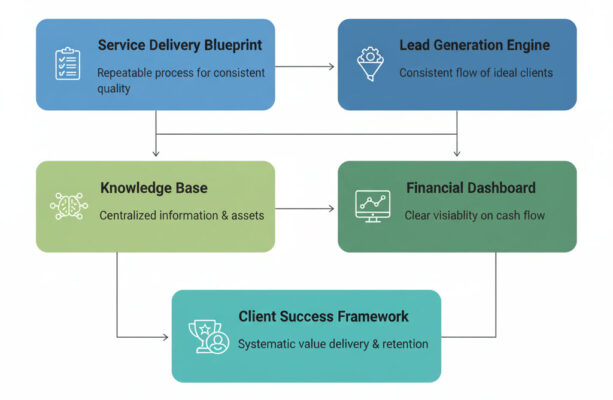
You don’t build a six-figure business by working harder. You build it by creating systems that compound over time.
System 1: The Service Delivery Blueprint
What it is: A step-by-step process that every client goes through, documented well enough that someone else could follow it.
Why it matters: This is what separates $80K ceiling from $200K+ potential. If delivery is all in your head, you can’t scale past your personal capacity.
What to document:
Discovery Phase:
- Standard questionnaire (what systems do you use? what’s manual today? what breaks most often?)
- Workflow mapping template (visual diagram of current state)
- Automation opportunity scoring (time saved × frequency × impact = priority)
Proposal Phase:
- Workflow diagram showing before/after
- Scope document (what’s included, what’s not)
- Pricing calculator (base price + complexity factors)
- Timeline with milestones
Build Phase:
- Standard workflow patterns (lead capture, data sync, notification, approval flows)
- Testing checklist (common edge cases to verify)
- Documentation template (how it works, how to troubleshoot)
Handoff Phase:
- Training agenda (30-60 min walkthrough)
- Admin access transfer checklist
- Maintenance SOP (what you’ll monitor, how they report issues)
Time investment to create: 15-20 hours initially, refine after each client Time saved per client: 8-12 hours by client #5 (less reinventing, more executing)
System 2: The Lead Generation Engine
What it is: A predictable process that generates 3-5 qualified conversations per month without you spending 20 hours on outreach.
Why it matters: Referrals are great but inconsistent. You need a system that works even when clients aren’t making intros.
The minimum viable engine (pick one):
Option A: Weekly Case Study Content
- Every Monday: Publish one automation breakdown (what problem, how you solved it, what changed)
- Share on LinkedIn with industry-specific hashtags
- Engage with 10-15 relevant posts per day
- Respond to every comment and DM
Time: 6-8 hours per week Results: 2-4 conversations per month by month 3
Option B: Partner Referral Network
- Identify 5-7 complementary service providers (web devs, marketing consultants, bookkeepers)
- Monthly co-working session or referral call
- Create co-branded case study or resource
- 15-20% referral fee for qualified intros
Time: 4-5 hours per week Results: 1-3 referrals per month by month 4 (but higher close rate)
Option C: Niche SEO + Email
- Write 2-3 in-depth automation guides for your niche
- Optimize for “[industry] + automation” keywords
- Capture emails with free audit or checklist
- Weekly email with tips + case studies
Time: 10-12 hours per week initially, 3-4 hours ongoing Results: 2-5 inbound leads per month by month 6-8
The key: Pick one and commit for 90 days before switching. Most people fail because they try all three for 2 weeks each and none gain traction.
System 3: The Financial Dashboard
What it is: A simple spreadsheet (or tool) that shows you exactly where your business stands every week.
Why it matters: You can’t make good decisions without knowing if you’re profitable, what’s working, and where you’re losing money.
What to track:
Weekly metrics:
- Active clients (who’s paying monthly retainer)
- Pipeline value (opportunities × close probability × average deal size)
- Delivery hours worked (are you over capacity?)
- Revenue this week vs. last week
- Tool costs (Make.com, APIs, software subscriptions)
Monthly metrics:
- Monthly Recurring Revenue (MRR from maintenance/retainers)
- Project revenue (one-time implementations)
- Profit margin (revenue minus all costs including your salary)
- Client acquisition cost (marketing spend + sales time × your hourly rate ÷ new clients)
- Client lifetime value (average client pays how much over how long?)
The critical ratios:
- MRR should be 30-50% of total revenue by month 12 (this is your predictable cash flow)
- Profit margin should be 60%+ after paying yourself (if lower, you’re underpriced or inefficient)
- Client LTV should be 5x+ acquisition cost (if lower, you’re spending too much on sales or clients churn too fast)
Example dashboard (simple Google Sheet):
Week of Oct 21, 2025:
- Active clients: 7 ($3,200 MRR)
- Pipeline: 3 opportunities ($18K total value, 40% close rate = $7,200 expected)
- Hours worked: 32 (delivery: 24, sales: 8)
- Revenue MTD: $14,500 (MRR + 2 project closes)
- Profit margin: 68% (after tools, taxes, salary)Tool: Start with a Google Sheet. Upgrade to QuickBooks + HubSpot only when you have 8+ clients and manual tracking becomes painful.
Time investment: 30 minutes per week to update Value: Knowing exactly when to raise prices, when to hire, when to cut unprofitable clients
System 4: The Knowledge Base
What it is: A central repository of every workflow you’ve built, every problem you’ve solved, and every question a client has asked.
Why it matters: By client #10, you’ll forget the clever solution you built for client #3. This is your external brain that makes you faster and smarter over time.
What to include:
Workflow Library:
- Screenshot or exported version of every automation you’ve built
- Description: what it does, what systems it connects, what problem it solves
- Complexity rating: simple (3 hours to replicate), medium (8 hours), complex (15+ hours)
- Notes: what was tricky, what broke during testing, what customizations were needed
Problem-Solution Database:
- Every technical issue you’ve encountered and how you fixed it
- Common client questions and your standard answers
- Edge cases and how to handle them (date formatting, timezone issues, API rate limits)
Client Onboarding Resources:
- Discovery call questions template
- Proposal templates by package type
- Training video recordings (you can reuse these instead of doing live training every time)
- FAQ document (saves you from answering “how do I reset my API key” 50 times)
Example entry:
Workflow: Lead Follow-up for Real Estate
Systems: Zillow leads → Make.com → ChatGPT → Gmail
Build time: 4 hours (now that it's templated)
Tricky parts: Zillow API throttles at 100 requests/hour, need rate limiting
Broke in testing: ChatGPT generated responses that were too long for SMS, had to add character limit
Client customizations: Some want 5-min response, others want 30-min (adjustable delay)Tool: Start with Notion or Airtable (free tier works fine). As you scale, consider Confluence or a custom wiki.
Time investment: 15-20 minutes after each client interaction to document Time saved: 2-4 hours per new client by month 8 (you’re not recreating from scratch or remembering how you solved something)
System 5: The Client Success Framework
What it is: A proactive process to ensure clients get value, stay happy, and refer others.
Why it matters: Retention is cheaper than acquisition. A client who stays 18 months is worth 3x one who churns at 6 months. Plus, happy clients refer—and referrals close at 50-60% vs. 30-40% for cold outreach.
The minimum viable framework:
Week 1 (Post-Launch):
- Check-in email: “How’s the automation working? Any issues?”
- Review usage data: Are they actually using it? (Check workflow run counts)
- Quick troubleshooting if needed
Week 4:
- Results check-in call (15-20 minutes): “What’s changed since we went live?”
- Capture specific wins: time saved, errors eliminated, revenue protected
- Ask: “On a scale of 1-10, how likely are you to recommend this to a colleague?”
- 8-10: Request testimonial and ask for 2-3 specific referrals
- 6-7: Identify what’s missing and fix it immediately
- <6: Emergency intervention—something’s broken or expectations weren’t met
Month 3, 6, 9, 12 (Quarterly Business Reviews):
- What’s working well with the automation?
- What could be better or what’s changed in their business?
- Upsell opportunity: “We’ve been tracking this other manual process you mentioned. Want me to automate it?”
- Renewal discussion (if on annual contracts)
When a client churns:
- Exit interview: “What didn’t work? What could we have done better?”
- Document feedback and adjust your process
- Don’t burn bridges—sometimes they come back when timing is better
The target: 80%+ retention rate year over year. If you’re below 60%, something is fundamentally wrong (bad delivery, wrong clients, or automations that don’t deliver value).
Time investment: 2-3 hours per month total across all clients Impact: 2-3x higher lifetime value, 50% more referrals, predictable revenue
Part 7: The 12-Month Implementation Timeline
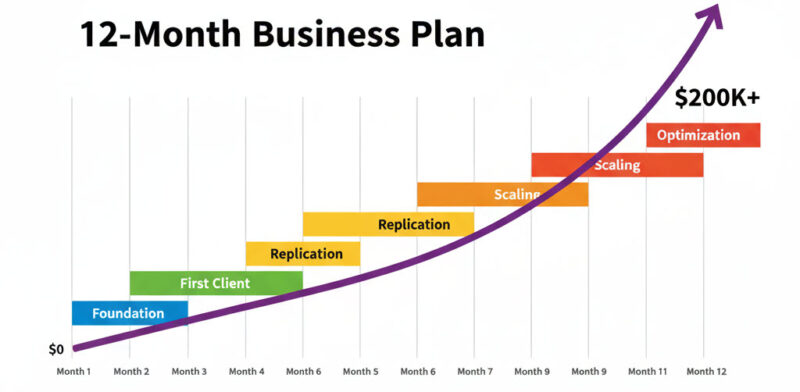
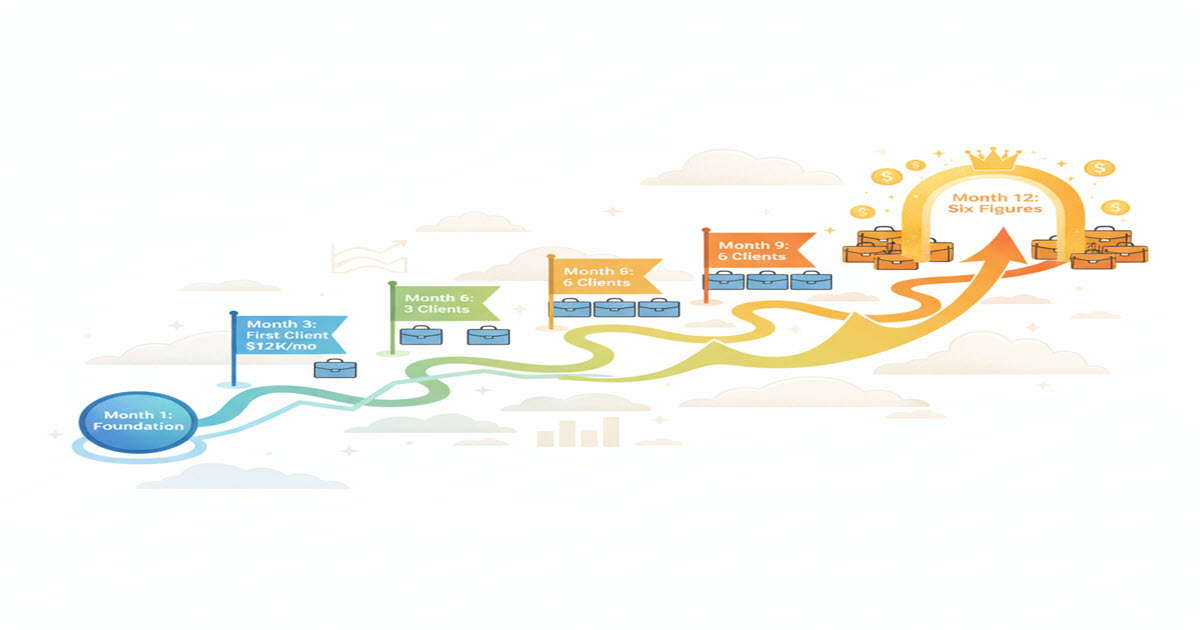
Here’s the realistic roadmap from “I’m interested” to “I’m making six figures.”
Months 1-2: Foundation Phase
Goals:
- Learn core tools (Make.com, ChatGPT API, one data management tool)
- Build your first complete workflow for yourself or a free pilot
- Choose your niche or initial positioning
- Create basic offer and pricing structure
Time commitment: 15-20 hours/week Investment: $300-500 (tools, learning resources, first project materials) Revenue: $0 (this is learning phase)
Key milestone: One working automation you’ve built yourself that solves a real problem and is documented with screenshots.
If you’re stuck here: You’re overthinking. Pick one workflow type and just build it. Perfect comes later, after you’ve done it three times.
Months 3-4: First Client Phase
Goals:
- Land first paying client ($2,000-3,500 project)
- Deliver successfully with full documentation
- Get testimonial and create case study
- Start conversations for clients #2 and #3
Time commitment: 20-25 hours/week Investment: $200-300/month (tools only) Revenue: $2,000-3,500 project + $200-400/month maintenance
Key milestone: One completed paid project with a happy client who will give you a testimonial and referrals.
If you’re stuck here: Your positioning is too vague or you’re not reaching out to enough prospects. Fix your messaging (be more specific about who you help and what problem you solve) and increase outreach volume (aim for 15-20 conversations, not 3-5).
Months 5-6: Replication Phase
Goals:
- Close and deliver clients #2 and #3
- Templatize your core workflow (identify the 80% that’s reusable)
- Create package pricing (stop doing custom quotes)
- Set up basic lead generation system (pick one channel)
Time commitment: 25-30 hours/week Investment: $300-400/month (tools + basic marketing) Revenue: $6,000-9,000 in projects + $800-1,500/month MRR
Key milestone: Client #3 should take 50% less time than client #1. If it doesn’t, you’re working in too many different industries—narrow your focus.
If you’re stuck here: You’re saying yes to too many different types of projects. Pick one industry or one problem type and become known for that. Everything else is noise.
Months 7-9: Scaling Phase
Goals:
- Add clients #4-6 (aiming for 6 total active clients)
- Hit $8,000-12,000/month revenue consistently
- Standardize your entire delivery process (every client goes through the same steps)
- Generate 3-5 qualified leads per month without manual outreach
Time commitment: 30-35 hours/week Investment: $400-600/month (tools + marketing) Revenue: $12,000-18,000 in projects + $2,500-4,000/month MRR
Key milestone: Revenue becomes predictable—you know what next month will look like based on your pipeline and recurring clients.
If you’re stuck here: You’re either underpriced (raise prices 30-50% after client #4) or your lead generation isn’t systematic (pick ONE channel and commit to it for 90 days, not 2 weeks).
Months 10-12: Optimization Phase
Goals:
- Reach 8-10 active clients
- Hit $100,000+ annual run rate ($8,500+ monthly average)
- Document all systems well enough that someone else could follow them
- Test one scaling lever (hire VA, add second lead gen channel, or raise prices significantly)
Time commitment: 35-40 hours/week (you’re at personal capacity) Investment: $600-800/month (tools + marketing + potential first hire) Revenue: $15,000-25,000 in projects + $4,000-7,000/month MRR
Key milestone: $100K+ annual run rate with systems that could work without you personally doing everything.
If you’re stuck here: You’ve hit the personal capacity ceiling. It’s time to either hire your first team member, raise prices by 40-60% and work with fewer higher-value clients, or shift to a more scalable model (productized services).
Beyond Month 12: Scale or Optimize Decision
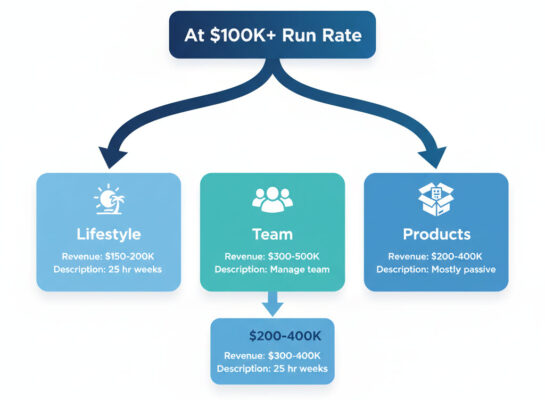
At this point, you have a real business generating six figures. Your next move depends on what you actually want:
Option A: Stay Solo, Optimize Margins
- Raise prices 40-60% across the board
- Drop your 2-3 lowest-value clients
- Work 25-30 hours per week
- Target: $150K-200K revenue, lifestyle business
- Best for: People who value time freedom over empire building
Option B: Build a Team, Scale Revenue
- Hire 1-2 automators or VAs to handle delivery
- Systemize everything so you manage, not execute
- Work 35-40 hours per week (but on strategy, not delivery)
- Target: $300K-500K revenue with team
- Best for: People who want to build a sellable asset or agency
Option C: Pivot to Products/Training
- Turn your systems into productized services or courses
- Less custom client work, more scalable offerings
- Work 20-30 hours per week (mostly on content and marketing)
- Target: $200K-400K revenue, more passive income
- Best for: People who want to leverage expertise without trading time for money
Most people choose Option A or B. Both are valid. The mistake is trying to do all three at once and making progress on none of them.
Part 8: Critical Resources and Next Steps
Essential Reading (Priority Order)
These spokes go deeper on each topic covered in this roadmap. Read them in order based on where you are in your journey:
If you’re evaluating the opportunity (start here):
- Why Selling AI Automation Actually Works in 2026 – Market dynamics and timing validation
- 7 Profitable AI Automation Niches for 2026 – Niche options with real economics
- The Automation-as-a-Service Business Model – Detailed model breakdown
If you’re getting your first client (months 1-4): 4. How to Conduct Discovery Calls That Reveal Bottlenecks – Complete discovery framework 5. Building an AI Automation Brand – Positioning and credibility building 6. Case Study: How I Landed My First $5K Automation Client – Real example with actual tactics used
If you’re delivering and scaling (months 5-12): 7. The Complete AI Automation Tool Stack – Tools overview and when to use each 8. How to Package and Price Automation Services – Pricing psychology and packaging models 9. Building Your First Client Automation Workflow – Step-by-step implementation walkthrough 10. 5 Automation Projects That Look Simple But Aren’t – Common pitfalls and how to handle them
If you’re optimizing and growing (month 12+): 11. Psychology of Selling Automation to Traditional Business Owners – Objection handling and trust building 12. From 1 Client to 10: Scaling Without Burnout – Systems and team building strategies 13. Why AI Automation Will Replace Freelancers Who Don’t Adapt – Market forces and urgency
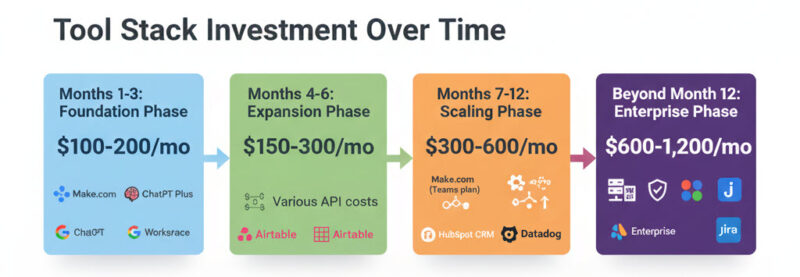
Tools Investment Roadmap
Here’s what you’ll actually spend as you grow:
Months 1-3 (Learning Phase): $100-200/month
- Make.com Basic plan ($10-29/month)
- ChatGPT Plus ($20/month) or basic API credits
- Google Workspace ($6-12/month)
- Airtable free tier ($0)
Months 4-6 (First Clients): $150-300/month
- Make.com Pro ($29-99/month)
- OpenAI API credits ($20-50/month for client work)
- Claude API credits ($20-50/month as backup)
- Airtable Plus or Notion paid tier ($10-20/month)
Months 7-12 (Scaling): $300-600/month
- Make.com Teams plan ($99-299/month for more operations)
- API credits scale with usage ($100-200/month)
- CRM for lead tracking (HubSpot free or Pipedrive $15/month)
- Monitoring tools (Uptime Robot, Sentry, error tracking) ($20-50/month)
Beyond Month 12: $600-1,200/month
- Enterprise tool tiers as you hit usage limits
- Team collaboration tools (Slack, project management)
- Advanced monitoring and analytics
- Marketing automation tools (if you go that route)
The key: Don’t buy tools you don’t need yet. Start cheap, upgrade only when you hit actual limits.
Common Questions
Q: Do I really need to know how to code?
No. You need to understand logic (if this happens, then do that) and be comfortable clicking around software, but you don’t need to write code. That said, basic JavaScript or Python helps when you hit edge cases that require custom functions. But you can learn that on the job when you need it—don’t let “I can’t code” stop you from starting.
Q: What if I pick the wrong niche in month 2?
You’ll know by client #3 if something’s wrong. Signs: delivery feels too custom every time, hard to find prospects, you don’t enjoy the work. That’s early enough to pivot without major sunk cost. Most people refine their niche 2-3 times in year one. It’s part of the process.
Q: How do I compete with AI that’s getting better at automation?
AI can’t do the business consulting part—understanding what’s actually broken in someone’s workflow and what should be automated versus left alone. The technical execution is getting easier (good for you—less time per project), which means the business insight becomes more valuable. Stay ahead by being the strategist who diagnoses problems, not just the executor who connects tools.
Q: What if my automation breaks and costs the client money or damages their business?
This is why you have maintenance contracts and build error handling into everything. Never automate something critical without: (1) notifications when something goes wrong, (2) manual approval steps for high-stakes actions, (3) clear rollback procedures. Get general liability insurance once you have 3+ clients (costs $500-800/year). And never, ever automate financial transactions without approval workflows or customer-facing communication without human review options.
Q: Should I specialize in one tool (like Make.com) or learn multiple platforms?
Start with one platform and learn it deeply. Make.com is the best choice for power and flexibility (better than Zapier for complex workflows). Learn it well enough to handle 80% of client needs. Add other tools (n8n, Zapier, custom APIs) only when specific client requirements demand it. Being known as “the Make.com expert for real estate” is way more valuable than being mediocre at five different tools.
Q: How long until I can quit my day job?
Plan for 6-9 months of part-time work (15-25 hours/week) before you’re ready to go full-time. You need 4-6 active clients generating $5K-8K monthly revenue before the transition makes financial sense. Most people stay part-time through months 1-6, then go full-time when monthly revenue is consistent for at least 3 months in a row. Don’t quit early—the financial stress will kill your ability to do good work.
Q: What’s the single biggest mistake people make?
Saying yes to every type of project instead of specializing. You end up with an e-commerce client, a real estate client, a SaaS client, and a professional services client—all completely different workflows with zero reusability. By month 8, you’re exhausted and wondering why you’re still working 50 hours a week. The second biggest mistake is underpricing because you’re afraid to lose the sale. The third is not asking happy clients for referrals—leaving money on the table.
Part 9: The Honest Reality Check
Let’s end with some uncomfortable honesty that most guides skip.
This Isn’t for Everyone
You’ll probably fail if:
- You’re looking for passive income (this requires active client work, at least initially—building automations, talking to clients, fixing things that break)
- You hate technology and just want to learn enough to make money (clients can tell when you don’t actually care about the work, and they won’t hire you)
- You’re not willing to commit 15-25 hours per week for at least 6 months (you can’t do this in “spare evenings after the kids go to bed” and expect real results)
- You expect fast results (realistic timeline is 4-6 months to first meaningful revenue, 9-12 months to six figures)
- You’re terrible at business conversations and can’t translate technical concepts into business outcomes (all the tool knowledge won’t save you if you can’t sell)
You’ll probably succeed if:
- You’re genuinely curious about how systems work and how to make them better (not just chasing money)
- You’re comfortable with technology but not obsessed with the shiny new tools (you focus on solving problems, not playing with tech)
- You can talk to business owners without sounding like a developer or using jargon they don’t understand
- You’re patient enough to build systems properly instead of chasing quick wins that don’t compound
- You’re okay with 6-12 months of hard work before seeing significant returns (delayed gratification)
The Market Will Change (And That’s Okay)
By 2027, automation services will be more commoditized. Tools will have better onboarding. AI will handle more of the technical setup. The barrier to entry will drop.
That doesn’t mean the opportunity disappears—it means it evolves.
The people who win long-term won’t be the ones who can connect APIs the fastest. They’ll be the ones who:
- Built strong reputations in specific niches by 2026-2027 (you can’t commoditize trust)
- Focused on business impact over technical wizardry (strategy doesn’t commoditize)
- Created actual systems and teams that multiply their leverage (you scale beyond personal capacity)
- Evolved from “I build automations” to “I solve business problems strategically, and automation is one tool in my toolkit”
Think about what happened to web design. The skill didn’t disappear when it commoditized in 2014—but generic web designers struggled while specialists thrived. The consultants who built deep expertise in e-commerce or healthcare or professional services kept charging premium rates. The generalists competed on price with templates and offshore labor.
Be the specialist, not the generalist.
The Decision Point
You now know everything you need to know:
- What this business model actually is (and what it isn’t)
- How the economics really work and what it takes to hit six figures
- The realistic timeline (not “30 days to your first client” fantasy—the real 6-12 month path)
- The systems that separate success from failure
- The common traps that kill most attempts before month 6
The only question left is: Are you actually going to start?
Not “someday when I have more time.” Not “after I take one more course on Make.com.” Not “when the market conditions are perfect.”
The window is now. It won’t stay open forever.
Every month you wait, the opportunity gets slightly more competitive. Not enough to disappear, but enough that the people who started today will have case studies, testimonials, and client relationships that you’ll be competing against in 6 months.
If you’re going to do this, Month 1 starts this week.
Not next month. This week.
Pick your first workflow. Build it. Document it with screenshots. Find someone who needs it solved. Have the conversation.
Everything else—the perfect positioning, the polished website, the fancy business cards—is just procrastination disguised as preparation.
Your Next Action (Choose One)
If you’re ready to start right now:
This week:
- Pick ONE automation workflow to master (choose from: lead follow-up, invoice tracking, customer onboarding, data syncing between tools, or customer support triage)
- Sign up for Make.com free trial and ChatGPT Plus
- Block out 8-10 hours this week to build that workflow for yourself
Next week:
- Document what you built with screenshots and a simple one-page description of what it does
- Think of 3-5 businesses that have this exact problem
- Message them with a simple offer: “I just built something that might help with [specific problem]. Can I show you how it works?”
Week 3-4:
- Have 5-10 conversations (goal: find one person willing to pay or let you build it for free in exchange for a testimonial)
- Close your first client or pilot project
- Deliver it and document everything you learn
That’s the playbook. The rest is just execution and iteration.
If you’re still evaluating and need more information:
Read these three spokes in this specific order:
- Why Selling AI Automation Actually Works in 2026 – Validate the market opportunity is real
- 7 Profitable AI Automation Niches for 2026 – See which niches have the best economics
- The Automation-as-a-Service Business Model – Understand the full model breakdown
Then come back and make a decision. Don’t read for another month—read for another week, then decide.
If you’re not ready and you know it:
That’s completely fine. Bookmark this guide.
The opportunity will still be here in 60-90 days, though it’ll be slightly more competitive. When you’re ready—when your circumstances change or your motivation shifts—you’ll know exactly where to start.
Just don’t fool yourself into thinking you’re “not ready yet” when what you really mean is “I’m scared to start.” Those are different problems with different solutions.
Final Thought
Most guides promise this is easy. This guide won’t do that.
This isn’t easy. But it’s also not as hard as:
- Building a SaaS product from scratch
- Raising venture capital and managing investors
- Learning to code professionally and competing for developer jobs
- Starting a traditional agency that requires a big team from day one
It’s hard in the way any real business is hard—you have to show up consistently, do work you don’t feel like doing sometimes, learn from expensive mistakes, and keep going when results are slower than you hoped.
The difference between people who make this work and people who don’t isn’t talent or connections or luck.
It’s persistence through the messy middle—that moment around month 4 when you’ve spent 40 hours on a project you underpriced by $2,000, you’re wondering if anyone will ever pay you full price, and you’re questioning whether this whole thing was a terrible idea.
If you can push through that moment (and the next one, and the one after that), you’ll build something real.
Most people quit right before the leverage kicks in. Right before client #4 takes 8 hours instead of 40. Right before the referrals start coming in without you asking. Right before it starts working.
Don’t be most people.
The opportunity is real. The path is clear. The timeline is realistic.
The rest is just showing up and doing the work.
Last updated: October 2025. Market conditions, tools, and best practices evolve quickly in this space. This guide reflects reality as of late 2025. If you’re reading this in 2027 or beyond, some specifics (tool pricing, market timing) may have shifted, but the core principles—solve real problems, specialize, build systems, charge appropriately—remain true.